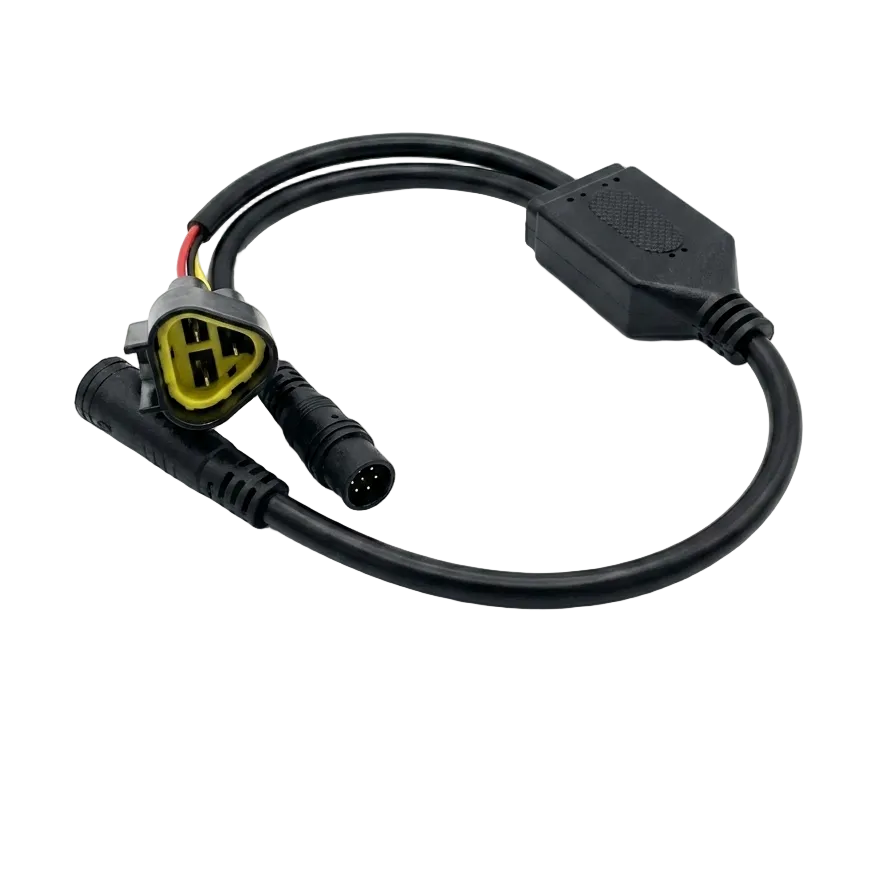
Tuttio Soleil 01 Plug & Play Surron Throttle
Tuttio Soleil 01 Plug & Play Surron Throttle
Couldn't load pickup availability
The stock throttle on the Tuttio Soleil 01 gets the job done — but it’s not the throttle you want once you’ve felt a Surron. The Soleil Supplies Plug & Play Surron Throttle brings factory-grade precision control, responsive feedback, and the confident feel of a professional-grade electric motorcycle to your ride. This drop-in replacement transforms your bike’s throttle experience with smooth power delivery, integrated display options (LCD screen showing speed, battery, and performance metrics), and support for multiple ride modes. Whether you’re chasing technical lines or cruising the flats, precise throttle control matters — and this upgrade delivers it without complex wiring or permanent modifications.
QUICK SPECS
- Plug & Play installation: Works seamlessly with stock Tuttio Soleil 01 controller
- Available in 15 variants: Multiple configurations with key switch or NFC startup, ABS Plastic or Metal construction, Black or Carbon Fiber finishes
- Integrated LCD Display: Real-time speedometer, battery percentage, power mode indicator, trip data
- Dual Control Options: Key Switch (traditional ignition) or NFC (keyless/card-based ignition)
- Material Options: ABS Plastic (lightweight, weather-resistant) or Premium Metal construction
- Price Range: $18–$115 USD depending on configuration
- Mounting: Direct-fit to Tuttio Soleil 01 frame; no adapter or drilling required
- Warranty: Manufacturer’s 12-month warranty covers manufacturing defects and electrical failures
WHAT’S INCLUDED
- Plug & Play throttle grip assembly (your chosen finish and control type)
- Integrated LCD display (Full Kit) or basic control module (Lite Kit)
- Pre-assembled connection harness (color-coded for easy installation)
- Watertight connector plugs with internal seals
- Mounting hardware and adhesive pads (if applicable)
- Quick-start installation guide with wiring diagrams
- 24/7 customer support via email and phone for setup questions
FEATURES
- Responsive Throttle Feel: Smooth, linear power delivery with no dead zones; precise control at any speed
- Real-Time Data Display: LCD screen shows speed, battery voltage, power draw, trip distance, and mode status
- Multiple Ride Modes: Compatible with Tuttio’s multi-mode system; watch mode transitions on your display
- Brake Sensor Compatible: Integrated safely with your stock brake sensors; no signal conflicts (common E08 errors are rare with proper installation)
- Sealed Connectors: Watertight design protects against moisture, dust, and trail spray
- Lightweight & Durable: ABS Plastic option weighs just 180g; Premium Metal option for extreme durability
- Quiet Operation: No grinding or mechanical noise; electronic control delivers smooth engagement
- Future-Ready: NFC option enables smartphone integration for diagnostics and mode customization (compatible with Fardriver ecosystem)
COMPATIBILITY
Direct-fit for Tuttio Soleil 01 models (2024–2026). Compatible with original Tuttio controller and upgraded Tuttio bags. Also pairs perfectly with Soleil Supplies suspension upgrades (Adjustable Suspension Forks - Premium Upgrade) and wheel sets (Supermoto Wheel Set) for a fully dialed-in ride experience. Not compatible with third-party controllers or modified Tuttio frames (case-by-case support available — contact us).
INSTALLATION & SETUP
- Power off your bike and remove the seat/battery cover to access the controller area
- Locate the throttle connection plug on your Tuttio controller (typically a 3-pin or 4-pin connector)
- Unplug your old throttle by gently pressing the connector tab and sliding it out
- Align the new Surron throttle connector with the controller port and push firmly until it clicks (internal watertight lip requires firm pressure to seat completely)
- Route the throttle cable through the handlebars using the factory cable routing (avoid sharp kinks)
- Tighten the throttle grip to your preferred tension (hand-tight, then 1/4 turn clockwise — do not over-tighten)
- If using LCD Display: Plug the display connector into the Y-cable; ensure the display powers on when you turn the bike key/NFC on
- Test the throttle at rest (display should show live data); then start the bike and confirm throttle response in all power modes
- If you get an error code (E08 or E10), see the FAQ section below for troubleshooting steps
FAQ - CUSTOMER ANSWERED QUESTIONS
Q: What does the E08 error code mean and how do I fix it?
A: The E08 error code indicates a connection or communication issue between your throttle, adapter wire, and controller. This is typically caused by loose connections or brake sensor conflicts. To resolve it: Check all connector plugs and push them in firmly until fully seated — our connectors have an internal lip for a watertight seal that requires a firm push to click completely into place. Verify that no pins inside the connectors are bent or pushed back. Disconnect your brake sensors entirely and test the throttle, as brake sensors often conflict with the throttle during initial installation and trigger the E08 code. Make sure the display connector is pushed all the way in. If the issue persists after these steps, contact our support team for a replacement adapter wire or connector cable.
Q: What does the E10 error code mean and how do I troubleshoot it?
A: The E10 error code indicates a display communication failure, typically caused by loose connections or faulty wiring between the display and controller. Common symptoms include display not responding, speedometer/speed not showing, or modes changing but power/torque not changing. To troubleshoot: Unplug the display connector and firmly reconnect it, ensuring it’s fully seated. Inspect all pins in the connectors to ensure none are bent or pushed back. Check that all wiring connections between the throttle, display, and controller are secure. If you’ve completed these steps and the E10 error persists, the display may need replacement. Contact us with a video or photo showing the error, and we can provide warranty support.
Q: My throttle is showing an error code — what should I do?
A: Most throttle error codes are related to loose connections or display communication issues. First, try these universal troubleshooting steps: Power off your bike and wait 30 seconds. Check all connector plugs — unplug and firmly reconnect each one, pushing until you feel them click into place. Inspect the pins inside all connectors for any damage or corrosion. Ensure no brake sensors or other components are conflicting with your throttle installation. If the error code persists after these checks, please send us a short video or photo of your setup along with a description of the error code you’re seeing, and our support team will help diagnose the issue and provide a solution.
Q: Are error codes covered by warranty?
A: Yes! Error codes caused by manufacturing defects, faulty connectors, or defective components are covered under our warranty. If your throttle is displaying a persistent error code and our troubleshooting steps don’t resolve it, we’ll send you a replacement component at no cost (we cover shipping). Simply reach out to support with details about the error code and your order information, and we’ll get you sorted right away.
Q: Will this work with my brake sensors?
A: Yes — the Plug & Play throttle is fully compatible with Tuttio’s stock brake sensors. However, brake sensors can occasionally trigger E08 communication errors during initial installation if they’re not properly isolated or if there’s a loose connection. If you experience E08 errors after installation, try disconnecting your brake sensors temporarily to test; then reconnect them once you’ve confirmed the throttle is working. This rules out sensor conflicts and helps our support team diagnose the root cause if issues persist.
Q: How do I know which variant to choose — Key Switch or NFC?
A: Key Switch is the classic option: turn a mechanical key to power on the bike, just like a traditional motorcycle. NFC (Near Field Communication) is keyless and futuristic — tap your phone or a programmable card to the sensor to power on. Key Switch is more durable for trail use and weather; NFC is lighter and more convenient for daily riding. Both are fully weatherproof. Choose whichever fits your riding style.
Share